What If Your Classroom Could Do More — Without Costing You More Time?
- Schools
- July 10, 2026
- Saloni Sacheti
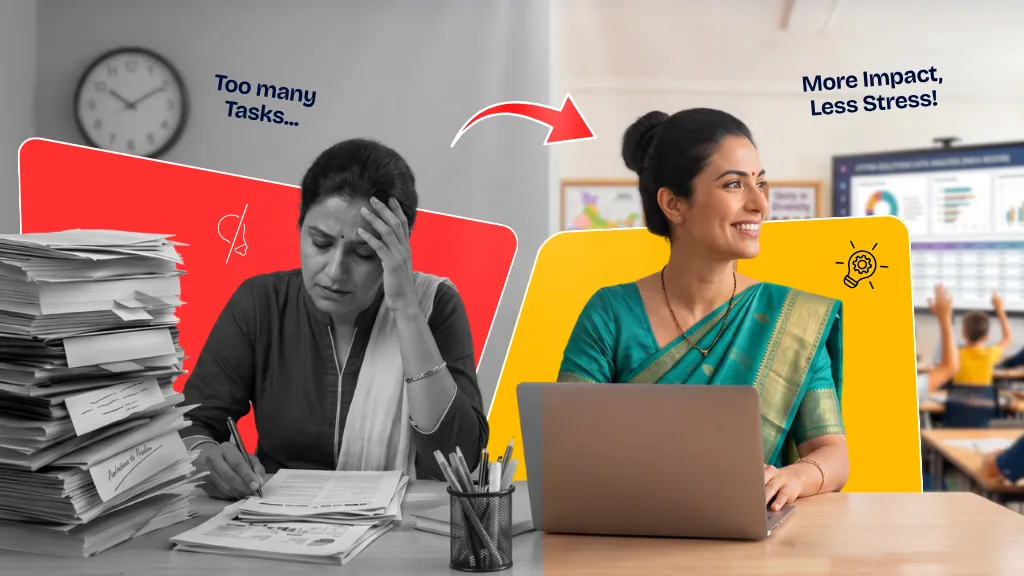
A practical guide for teachers on making digital resources actually work.
There’s a moment most teachers know well. It’s Sunday evening. You’re halfway through planning the week, your chai has gone cold, and you’re still searching for that one worksheet, that one worksheet, that will make Monday’s lesson click for the back-benchers who’ve been struggling since last month. You’ve visited four different websites, downloaded two PDFs that turned out to be wrong grade levels, and it’s almost 10 PM.
Sounds like your Sunday Evening too?
Here’s the thing — the problem isn’t that digital resources don’t exist. They’re everywhere. The real challenge is finding educational resources for schools and teachers that are actually curriculum-aligned, classroom-ready, and don’t require a PhD in technology to use. That gap between “there’s so much out there” and “but nothing quite fits” is exactly where most teachers lose time and energy every single week.
This blog is about closing that gap.
Digital Resources in Education: More Than Just Screens
Let’s be honest about something. The phrase “classroom technology integration” can sound intimidating — even a little exhausting. It brings to mind complicated setups, unreliable Wi-Fi, and students who somehow always know more about the device than you do.
But digital resources in education, when done right, aren’t about turning your classroom into a tech lab. They’re about making your teaching sharper, your students more engaged, and your Sunday evenings a little less stressful.
The most effective digital learning tools for educators work quietly in the background — they support what you already do brilliantly, they just do it faster, richer, and with more variety than a single textbook can offer.
A good digital resource should:
- Align with what you’re actually teaching that week
- Encourage students to do something
- Be simple enough that you’re not spending more time learning the tool than using it
- Save you real time in planning, assessment, and revision
- Work for different kinds of learners in the same classroom
When those boxes are ticked, technology stops being a burden and starts being a genuine teaching partner.
The Mistake Most Schools Make With EdTech
Teachers don’t need more content. They need the right content, organised around the way a school day actually flows — from lesson planning in the morning to concept delivery in class, practice and assessment through the week, and revision as exams approach.
Free teaching resources that understand this flow aren’t just convenient. They fundamentally change how prepared and confident a teacher feels walking into the classroom.
This is the philosophy behind what Viva Education has built: a suite of digital learning tools for educators that map directly onto real classroom moments.
Digital Resources in Action: How Viva Education Supports Teachers and Schools
The following resources from Viva Education are available exclusively for teachers and schools as integral parts of the teaching-learning cycle.
1. Teacher Manuals
Ask any experienced teacher what they wish they’d had in their first few years, and most will say the same thing: better lesson plans. Not just a topic outline, but a proper, thoughtful plan — what to do first, what questions to ask, how to handle the class when they’re not getting it.
Viva Education’s Teacher Manuals do exactly that. They include structured lesson plans, answer keys, worksheets, teaching suggestions, and classroom activities — all built around the curriculum, all ready to use.
How teachers are using them:
- Planning weekly lessons without starting from scratch each time
- Pulling worksheets for reinforcement and homework without hunting across the internet
- Using answer keys to speed up correction and give faster feedback
- Adapting suggested activities for different classroom sizes and learning levels
For newer teachers, these manuals are a confidence-builder. For experienced ones, they’re a time-saver. Either way, they reduce the Sunday-evening scramble considerably.
2. Chapter Animations
Think about the water cycle. The digestive system. How electricity flows through a circuit. Fraction division. These are concepts that make complete sense once a student sees them — and remain stubbornly confusing when they read about them only.
Chapter animations bring these moments to life. Short, curriculum-linked animated videos that help students visualise ideas, processes, and abstract concepts before the deeper classroom discussion begins. It also helps keep students engaged in the classroom.
Where they work best:
- As a hook at the start of a new chapter — sparking curiosity before you even open the textbook
- To explain processes in Science, Maths, Social Studies, and Languages that benefit from visual storytelling
- During revision, when students need a quick, engaging refresher before assessments
- To re-engage a class that’s losing focus mid-lesson
One teacher described it well: “Once they’ve seen the animation, the conversation in class is completely different. They come in with questions instead of blank faces.”
That shift — from passive to curious — is worth a lot.
3. Test Generator
Creating a question paper is one of those tasks that looks simple on the surface and somehow takes two hours. You need to balance difficulty levels, cover the right chapters, make sure you’re not repeating last term’s questions, and format it legibly — all before the printer jams.
Viva Education’s Test Generator lets teachers create customised assessments in a fraction of that time, based on learning objectives and classroom needs.
Classroom applications:
- Unit tests and chapter-end assessments
- Practice papers in the weeks before board exams or term tests
- Quick formative checks after completing a topic
- Differentiated papers for students at different learning levels in the same class
This is one of the most practically impactful free resources for teachers — because it gives back something teachers rarely have enough of: time.
4. Interactive Exercises
Here’s what we know about learning: you don’t truly understand something until you’ve tried to do it yourself, gotten something wrong, and then figured out why. That cycle of attempt → feedback → correction is where real understanding happens.
Interactive exercises on Viva Education’s platform put students in exactly that cycle. They apply concepts, receive immediate feedback, and can try again — without waiting for a teacher to mark a notebook.
Best used for:
- In-class practice sessions, especially during activity periods
- Learning corners or station-based activities where students work at their own pace
The difference between filling out a worksheet and completing an interactive exercise isn’t just the medium — it’s the engagement level. Students who might switch off during written practice often stay genuinely focused when the activity responds to them.
5. Audios and Audio Transcripts
Listening is consistently one of the weakest-assessed skills in school examinations because it rarely receives dedicated classroom time. Reading and writing take priority, and listening practice quietly falls off the schedule.
Viva Education’s audio resources, available in English and Hindi with accompanying transcripts, make it easy to weave listening into regular classroom practice without elaborate setup.
How to use them effectively:
- Listening comprehension exercises with the transcript as a follow-up tool
- Pronunciation and fluency practice in language classes
- Read-along sessions where students follow the transcript as the audio plays
- Support for students who learn better through sound than through text
The transcripts are particularly useful for teachers — they can be projected for whole-class read-alouds, used as guided reading material, or handed out for annotation exercises. Two resources, multiple uses.
6. E-books
An e-book is, at its simplest, the digital version of the physical textbook. But in practice, it opens up a surprising number of classroom possibilities that a paper copy doesn’t.
How to use them effectively:
- Listening comprehension exercises with the transcript as a follow-up tool
- Pronunciation and fluency practice in language classes
- Read-along sessions where students follow the transcript as the audio plays
- Support for students who learn better through sound than through text
For schools managing large classrooms or multiple sections, e-books also bring a consistency that’s hard to maintain otherwise — every student is literally on the same page.
Putting It All Together: A Day in a Well-Resourced Classroom
Here’s what thoughtful classroom technology integration actually looks like in practice, something teachers can build toward now.
You begin a new chapter with a chapter animation that immediately prompts students to ask questions. You use the Teacher Manual to guide your lesson flow and know exactly which worksheet to pull for reinforcement. Students complete interactive exercises as a follow-up activity, getting instant feedback while you circulate the room. A listening exercise using audio resources wraps up the language component. At the end of the unit, the Test Generator produces a well-balanced assessment in minutes. And throughout, the e-book keeps everyone working from the same reference point.
This isn’t about maximising technology. It’s about maximising learning — with tools that make the teacher’s job more focused and the student’s experience richer.
Why Free Teaching Resources Matter More Than Ever
Teacher professional development and educational support for schools have traditionally been expensive or inaccessible — conference registrations, resource subscriptions, training programs with significant costs attached. Smaller schools, schools in Tier 2 and Tier 3 cities, and newer institutions often miss out simply because of budget.
Viva Education’s digital resources for teachers and schools are available free of charge, which means the quality of educational resources a school can access shouldn’t depend on its budget size. Every teacher deserves the support to teach well. Every student deserves a teacher who has the tools to make learning engaging.
That’s the case for free educational resources for schools as a standard.
A Final Word for Teachers
You already know how to teach. You’ve spent years developing instincts, reading rooms, adjusting on the fly, and finding ways to make things make sense for thirty different minds at once. That skill doesn’t come from a digital tool.
But the right digital learning tools for educators can amplify what you do — they can save you hours of preparation, bring your lessons to life in ways that hold attention, and give your students more opportunities to practice and grow.
Viva Education’s suite of classroom resources was built with exactly that in mind: to make the teacher’s work more impactful, more efficient, and — on a good day — a little more joyful.
Because when the lesson goes well, when the class is engaged, when a student finally gets it — that’s the moment all the preparation was for.
These tools exist to help you get there more often.
Viva Education’s digital resources — including Teacher Manuals, Chapter Animations, Test Generator, Interactive Exercises, Audio Resources, and E-books — are available exclusively for teachers and schools.
Frequently Asked Questions (FAQs)
1. What are digital resources in education?
Digital resources in education are technology-enabled tools for teaching and learning, such as e-books, animations, interactive exercises, audio resources, assessments, and teacher support materials, that enhance classroom instruction and student engagement.
2. How do digital resources help teachers?
Digital resources help teachers save time on planning, deliver concepts more effectively, create assessments quickly, provide instant practice opportunities, and support diverse learning styles in the classroom.
3. What are the benefits of using chapter animations in the classroom?
Chapter animations help students visualise complex concepts, improve understanding, increase engagement, and encourage curiosity before deeper classroom discussions begin.
4. How can a Test Generator support assessment planning?
A Test Generator allows teachers to quickly create customised question papers and assessments, ensuring balanced coverage of topics while significantly reducing preparation time.
5. Why are interactive exercises important for learning?
Interactive exercises provide immediate feedback, encourage active participation, and help students learn through practice, correction, and reinforcement of concepts.
6. How do audio resources improve language learning?
Audio resources strengthen listening, pronunciation, fluency, and comprehension skills. Accompanying transcripts also support guided reading and classroom discussions.
7. What role do e-books play in modern classrooms?
E-books provide flexible access to textbook content, support blended learning, enable classroom projection, and ensure consistency in instruction across different learning environments.
8. Are Viva Education's digital resources available for schools and teachers?
Yes. Viva Education offers Teacher Manuals, Chapter Animations, Test Generator, Interactive Exercises, Audio Resources, and E-books as part of its digital learning ecosystem for schools and teachers.
Share on:
Written by: